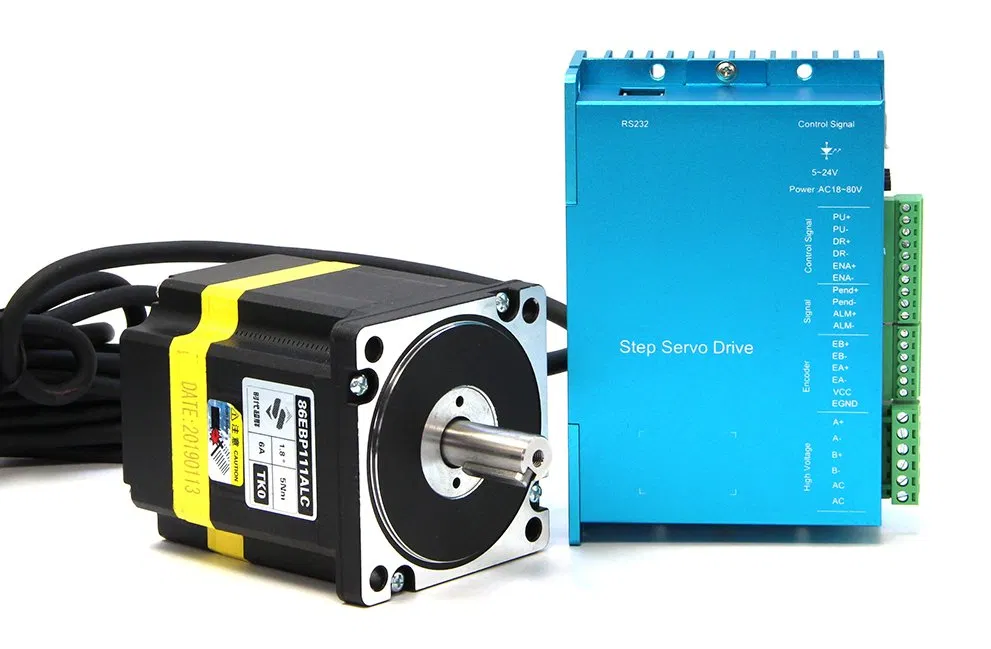
A closed loop stepper is an ordinary stepper motor with an encoder on its shaft and a drive that checks, many times a second, whether the motor is where it was told to be. If it has fallen behind, the drive pushes harder to catch up. If it cannot, the drive stops and raises an alarm instead of carrying on in the wrong place.
That one change removes the biggest weakness of a normal stepper, the lost step nobody notices, at a price much closer to a stepper than to a servo. This guide explains how a closed loop stepper motor works, what it fixes and what it does not, and how to wire and set one up on a CNC machine.
How a Closed Loop Stepper Works
A normal stepper system is open loop. The controller sends step pulses, the drive moves the motor one step per pulse, and nobody checks the result. If the load is too heavy or the acceleration too high, the motor slips, and the controller keeps going as if nothing happened. Our guide to stepper vs servo motors explains why that is the main risk of steppers.
A closed loop stepper adds three things:
- An encoder on the motor shaft. It reports the real shaft position. A common choice is a 1,000-line encoder, which gives 4,000 counts per revolution.
- A drive that compares commanded and actual position. The controller still sends ordinary step and direction pulses. The drive counts them, reads the encoder, and works out the difference, called the position following error.
- Current that follows the load. Instead of driving full current all the time, the drive raises current when the motor needs torque, such as during acceleration or a heavy cut, and lowers it when the load is light.
If the following error grows past a limit set in the drive, the drive stops the motor and switches on its alarm output. On many drives the motor shaft is then released, so the axis is no longer held.
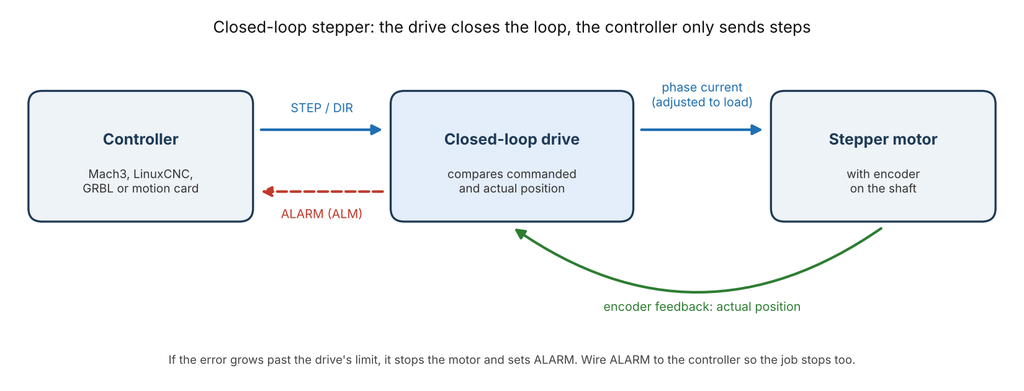
You will also see these motors sold as a hybrid servo or easy servo. The names differ by brand, but the idea is the same: stepper motor, encoder, and a drive that closes the loop.
Open Loop vs Closed Loop Stepper vs Servo
| Open-loop stepper | Closed loop stepper | AC servo | |
|---|---|---|---|
| Feedback | None | Encoder to the drive | Encoder to the drive |
| Lost steps | Go unnoticed | Corrected, or alarm if too large | Corrected, or alarm if too large |
| Motor current | Constant, runs warm | Follows the load, runs cooler | Follows the load |
| Torque at high speed | Falls off sharply | Falls off like any stepper | Stays high to rated speed |
| Tuning | Little | Little; many drives auto-tune | Gain tuning usually needed |
| Controller signals | Step and direction | Step and direction, plus alarm | Step and direction, plus alarm |
| Typical cost | Lowest | Moderate | Highest |
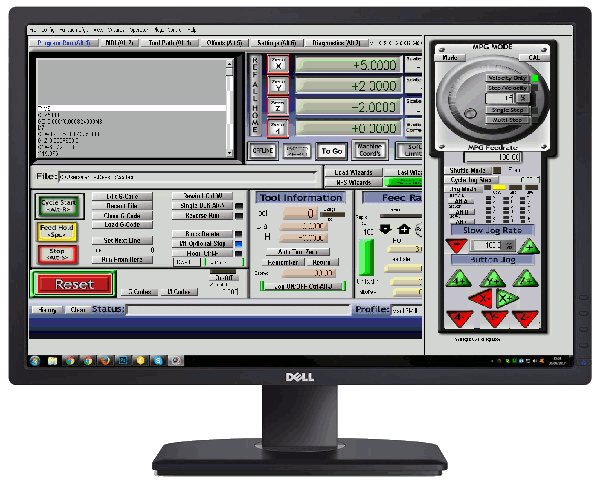
The last two rows matter for upgrades. A closed loop stepper takes the same step and direction signals as an open-loop one, so the controller and its software do not change. The drive closes the loop on its own; Mach3, for example, never reads the encoder.
What a Closed Loop Stepper Fixes, and What It Does Not
It fixes:
- Undetected lost steps. A brief overload is corrected. A large one stops the machine with an alarm instead of ruining the rest of the part.
- Heat and noise. Because current drops when the load is light, the motor runs cooler and quieter. A motion-control vendor writing in Machine Design reported that a closed-loop system used as little as a third of the power of an open-loop one on the same motion, and was often 10 dB or more quieter. These are vendor figures, so treat them as a best case.
- Oversizing. Open-loop steppers are often chosen with at least 40% spare torque to avoid stalling, according to Servotronix. With feedback, the motor can be sized closer to the real load.
It does not fix:
- Falling torque at speed. It is still a stepper. Its torque drops as speed rises, so very fast rapids remain a job for servos. Servotronix puts the usual crossover at around 800 RPM.
- Backlash, belt stretch, or a loose coupling. The encoder sits on the motor shaft, not on the table. If the motor is in the right place but the screw or belt is not, the drive cannot see it.
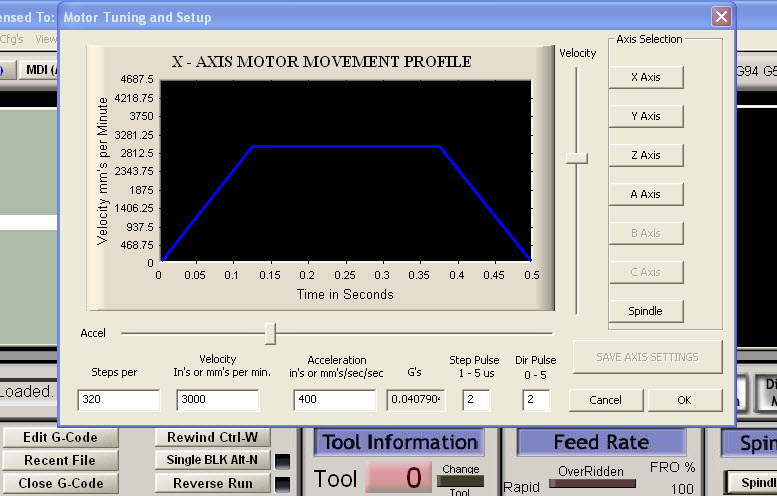
- Bad settings in the controller. Steps per unit, velocity, and acceleration still need to be set correctly; see Mach3 motor tuning.
Choosing a Closed Loop Stepper
- Frame size and torque. NEMA 23 and NEMA 24 are typical for small routers and mills; NEMA 34 for heavier gantries and knee mills. Check the torque-speed curve at the speeds you will actually use, not only the holding torque.
- Buy motor and drive as a matched set. The drive has to suit the motor’s encoder type and line count, and many drives auto-tune to their own motors on power-up.
- Supply voltage. Higher voltage keeps torque up at higher speed. Stay inside the drive’s rated range; Leadshine’s CS-D808, for example, trips an over-voltage alarm above 110 VDC.
- Alarm and enable signals. Make sure the drive has an alarm output, and that your controller has a spare input to receive it.
- Encoder cable length. If the motor is far from the drive, order the matching extension cable rather than splicing.
Wiring a Closed Loop Stepper Drive
A typical drive has four groups of connections:
- Power: DC supply to the drive’s V+ and GND.
- Motor phases: A+, A−, B+, B− to the motor’s power cable.
- Encoder: the encoder cable (usually EA+, EA−, EB+, EB−, +5 V, and ground) into its own connector.
- Control signals: step (PUL), direction (DIR), and enable (ENA) from the controller, and alarm (ALM) back to it.
Keep the encoder and signal cables shielded and away from the motor power cables. Encoder noise can show up as random following-error alarms.
The alarm output deserves care. On most drives it is an open-collector transistor that needs a pull-up to your controller’s input voltage. Leadshine’s CS-D drives rate it at 20 mA and 5 to 24 V, and let you choose whether it is active high or low. Before wiring it to the controller, check with a meter which state it is in when the drive is healthy and when it is in alarm. Then wire it to an input that stops the machine, such as the E-Stop input in Mach3.
Treat the alarm as a way to stop a bad job, not as a safety circuit. By the time it trips, the axis has already stopped, and possibly hit something. A real emergency stop still needs its own hard-wired circuit.
Setting Up a Closed Loop Stepper with Mach3
Setup is almost the same as for an open-loop stepper:
- Set pulses per revolution on the drive. Closed-loop drives use DIP switches or software. The Leadshine CS-D808 offers settings from 800 to 51,200 pulses per revolution, with 1,600 as the default.
- Calculate steps per unit from that number. With 1,600 pulses per revolution and a 5 mm ballscrew, steps per unit = 1,600 ÷ 5 = 320 steps per mm.
- Map the alarm input. In Mach3, assign the drive’s alarm to an input that triggers E-Stop.
- Tune velocity and acceleration. Start low and work upward, as in Mach3 motor tuning. A closed-loop system will not lose position silently, but pushing too hard now trips the alarm instead.
- Test the alarm. With the axis stationary, simulate a fault, for example by disconnecting the alarm wire at the controller input if it is wired to fail safe, and confirm that Mach3 goes into E-Stop.
If you are replacing the drives on an older machine, our guide to retrofit support covers the rest of the controller.
Troubleshooting Common Closed Loop Stepper Problems
Position following error alarm during fast moves. The motor cannot keep up: the commanded speed or acceleration is too high for its torque. Lower acceleration first, then maximum velocity, or raise the supply voltage within the drive’s rating.
Position following error alarm when barely moving. Suspect the encoder wiring. Check the connector, the cable, and the A and B channels. Some drives can be switched temporarily to open-loop mode; if the alarm stops in open loop, the encoder side is at fault.
Alarm only during heavy cuts. The cutting force is more than the motor can deliver at that speed. Reduce the depth or feed, or check the feeds and speeds.
Over-voltage alarm when the axis stops. A fast deceleration sends energy back into the supply. Lengthen the deceleration or use a supply with more headroom.
Motor vibrates or will not hold position at power-up. The drive cannot lock the shaft, often because the motor phases or encoder are wired wrongly or the motor does not match the drive.
Positions drift but there is no alarm. The problem is after the motor: backlash, a slipping coupling, or a loose pulley. See troubleshooting and calibration.
Most drives show the fault with a blinking LED. On the Leadshine CS-D808, for example, seven red flashes mean position following error. The code list is in each drive’s manual.
Frequently Asked Questions
Is a closed loop stepper the same as a servo?
No. It uses a stepper motor with an encoder, so it gains feedback and alarm protection, but its torque still falls at high speed. A true servo keeps its torque up to rated speed and can briefly deliver several times its rated torque.
Do closed loop steppers still lose steps?
They can still be overloaded, but they do not lose steps silently. A small error is corrected by the drive; a large one stops the motor with a position following error alarm.
Does Mach3 work with closed loop steppers?
Yes. Mach3 sends step and direction exactly as it does for an open-loop stepper. It does not read the encoder; the drive handles that. Wire the drive’s alarm to a Mach3 input so a fault stops the job.
Are closed loop steppers worth it for a hobby CNC router?
Often, yes, if lost steps have ruined parts or if the motors run hot. The upgrade keeps the same controller and wiring style. If the machine already runs reliably, better tuning may be all it needs.
Can I add an encoder to my existing stepper motor?
It is possible if the motor has a rear shaft and the drive accepts that encoder type, but matched motor-and-drive kits are simpler and auto-tune to each other.
Need Help Upgrading Your CNC Motors?
RunTechEngineer helps choose, wire, and tune motors and drives for CNC machines, including alarm wiring and Mach3 setup. See our Mach3 CNC controller services, or contact us with your machine, motors, and the problem you are seeing.