MQTT vs HTTP is a choice between two ways for a device to talk to a server. With HTTP, the device opens a request, sends its data, and waits for a reply, every time. With MQTT, the device keeps one connection open to a broker and pushes small messages through it whenever it has something to say.
The short answer: use MQTT when a device sends frequent small readings, runs on a battery, or needs to receive commands. Use HTTP when it sends data occasionally or in batches, downloads files, or talks to an existing web API. Many real systems use both. This guide to MQTT vs HTTP for IoT explains how each works, what the measured differences are, and how to choose.
How HTTP Works for IoT Devices
HTTP is the protocol of the web. The client, in this case the device, always starts the conversation: it sends a request such as a POST with a JSON body, and the server sends back a response. Each request carries text headers, often a few hundred bytes, and with HTTPS the connection also needs a TLS handshake before any data moves.
That model has one important limit for IoT. The server cannot send anything to the device unless the device asks first. To find out whether there is a new command or setting, the device has to poll: ask the server every few seconds or minutes, even when the answer is “nothing new”.
How MQTT Works: Broker, Topics, and Publish/Subscribe
MQTT was created in 1999 by Andy Stanford-Clark of IBM and Arlen Nipper, then at Arcom Control Systems, to monitor oil pipelines over expensive satellite links. It was designed from the start to use little bandwidth and little power. It became an OASIS standard in 2014 (version 3.1.1), and version 5.0 followed in 2019.
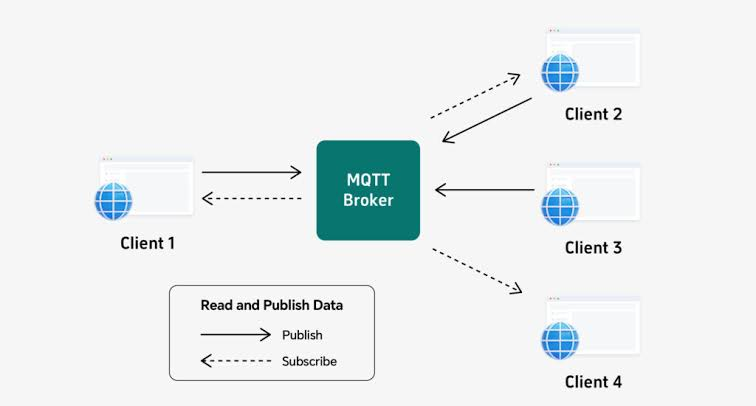
MQTT uses a publish/subscribe model with three parts:
- The MQTT broker is a server that receives every message and passes it on. Common brokers include Mosquitto, HiveMQ, and EMQX, and cloud IoT platforms run their own.
- Topics are named channels, such as
factory/line1/press3/temperature. A device publishes to a topic; it does not need to know who is listening. - Subscribers tell the broker which topics they want. A dashboard, a database, or another device can subscribe and receive each new message as soon as the broker gets it.
The device opens one TCP connection to the broker and keeps it open. Messages are binary and compact: the fixed header is only 2 bytes. Because the connection stays open, the broker can also send messages to the device at any time, so commands arrive without polling. MQTT normally runs on port 1883, or 8883 with TLS encryption.
MQTT vs HTTP: Side-by-Side Comparison
| MQTT | HTTP | |
|---|---|---|
| Model | Publish/subscribe through a broker | Request/response, client to server |
| Connection | One long-lived connection | Usually one request per exchange (keep-alive can reuse it) |
| Message overhead | Binary, 2-byte fixed header plus topic | Text headers, typically hundreds of bytes |
| Sending data to the device | Yes, the broker pushes it | Only if the device polls |
| One message to many receivers | Built in: every subscriber gets it | The server has to forward it to each one |
| Delivery guarantees | QoS 0, 1, or 2 | Retry logic is up to you |
| Knowing a device went offline | Last will message, keep alive | Not built in |
| Large files (firmware, images) | Possible, but not what it is designed for | Well suited |
| Extra infrastructure | Needs a broker | Any web server or API |
| Default ports | 1883, or 8883 with TLS | 80, or 443 with TLS |
What the Measurements Show
The flespi IoT platform, which supports both protocols, published a set of side-by-side tests in 2018. Their numbers are a useful guide, with the caveat that they come from one vendor, one setup, and older software.
The most telling test sent 1,000 small JSON messages over an encrypted connection in three ways:
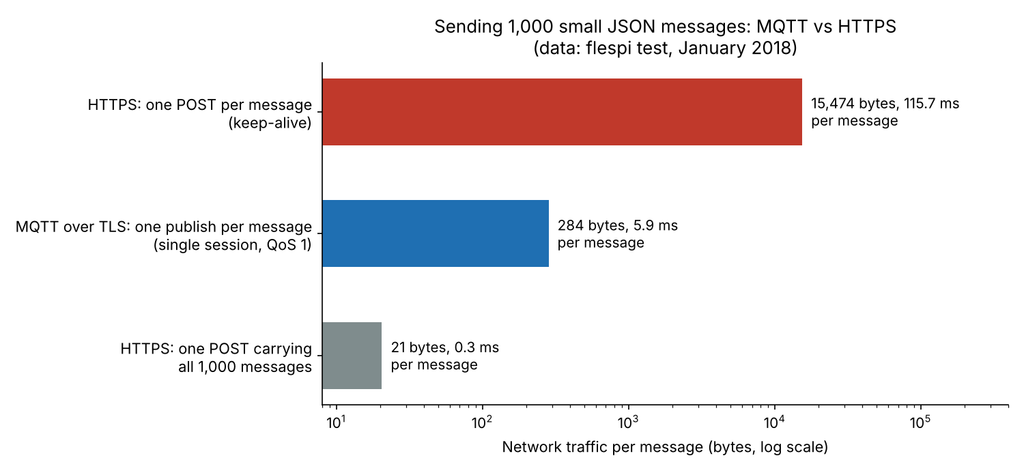
- MQTT, one publish per message on a single session: about 284 bytes and 5.9 ms per message.
- HTTPS, one POST per message with keep-alive: about 15,474 bytes and 115.7 ms per message, roughly 50 times more traffic.
- HTTPS, one POST carrying all 1,000 messages: about 21 bytes and 0.3 ms per message, the cheapest of the three.
The other tests point the same way. Delivery from the server to a waiting client averaged 32 ms over MQTT against 768 ms by polling the REST API. On a Raspberry Pi running from a battery over 3G, MQTT used 0.170 mAh per session against 0.216 mAh for HTTP, about 21% less energy.
One result is easy to miss. For a single exchange that connects, sends one message, and disconnects, plain HTTP and MQTT used almost the same traffic: 675 and 615 bytes out. MQTT’s advantage comes from keeping the connection open and sending many small messages through it. If a device wakes once an hour, sends one reading, and goes back to sleep, the gap shrinks, and batching readings into one HTTP request can beat both.
What MQTT Adds That HTTP Lacks
Quality of service levels
Each MQTT message can be sent at one of three QoS levels:
- QoS 0, at most once: sent with no acknowledgement. Fine for frequent readings where losing one does not matter.
- QoS 1, at least once: the receiver acknowledges, and the sender repeats until it does. Duplicates are possible.
- QoS 2, exactly once: a four-step handshake guarantees a single delivery, at the cost of more traffic and delay.
Retained messages
The broker can keep the last message on a topic and hand it to anyone who subscribes later. A dashboard that opens at 9:00 sees the latest machine status immediately, instead of waiting for the next reading.
Last will and keep alive
When a device connects, it can leave a “last will” message with the broker. If the device drops off without disconnecting cleanly, the broker publishes that message, for example status: offline. Combined with the keep-alive timer, this tells the rest of the system within seconds that a machine has gone silent, which HTTP cannot do on its own.
When HTTP Is the Better Choice
- Infrequent or batched data. A sensor that uploads once an hour, or stores readings and sends them in one batch, gains little from a permanent connection.
- Downloading files. Firmware updates, configuration files, and images are a natural fit for HTTPS.
- Existing web services. If the data goes into a REST API, a webhook, or a spreadsheet service, HTTP needs no extra infrastructure.
- Restrictive networks. HTTPS on port 443 passes almost every firewall. MQTT can do the same by running over WebSockets, but it takes extra setup.
Cloud platforms reflect this split. AWS IoT Core, for example, accepts MQTT and HTTPS, but over HTTPS a device can only publish: it cannot subscribe, the platform cannot detect when it disconnects, and it cannot receive messages it missed while offline. AWS recommends MQTT for most device communication.
When MQTT Is the Better Choice
- Frequent small readings, such as temperature or vibration every few seconds.
- Battery-powered devices that stay connected and send often.
- Two-way control, where the device must receive commands or setting changes quickly.
- Many receivers for the same data, such as a dashboard, a database, and an alert service all watching one machine.
- Unreliable links, where QoS and the last will message help you know what arrived and who is offline.
For a working example with code, see our ESP32 MQTT tutorial.
Using Both in One System
The two protocols are not rivals so much as tools for different jobs. A typical machine-monitoring setup on an ESP32 might work like this:
- The device publishes temperature and vibration readings over MQTT every few seconds.
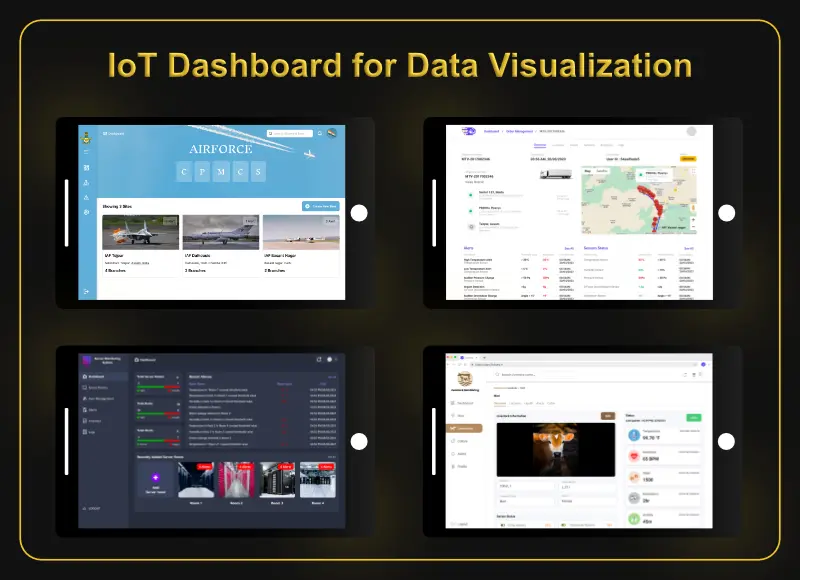
- A remote monitoring dashboard and an alert service subscribe to the same topics.
- Commands, such as a new sampling rate, reach the device through a topic it subscribes to.
- Firmware updates are downloaded over HTTPS when the device is told one is available.
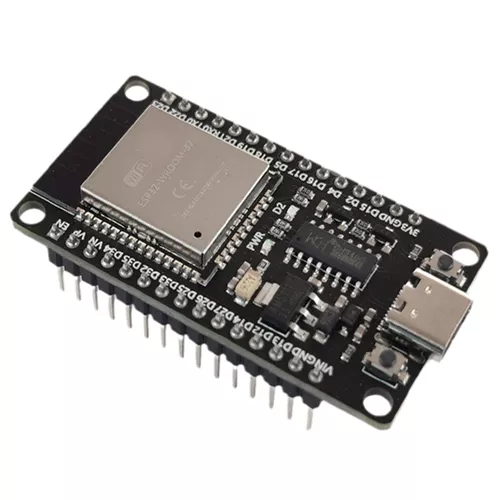
On the ESP32 itself both are well supported. Espressif’s ESP-IDF framework includes the ESP-MQTT client, which supports MQTT 5.0 and TLS, alongside an HTTP client. If you are still choosing a board, see ESP32 vs Arduino.
Security Basics for Either Protocol
Both protocols should run over TLS on anything that leaves your own network: MQTT on port 8883 and HTTP as HTTPS on 443. Never expose an unencrypted broker on port 1883 to the internet. Give each device its own credentials, a username and password at minimum and a client certificate where the platform supports it, and on the broker, limit each device to the topics it actually needs.
Frequently Asked Questions
Is MQTT faster than HTTP?
For many small messages over a connection that stays open, yes, by a wide margin: in flespi’s test MQTT took about 6 ms per message against about 116 ms for one HTTPS request per message. For a single message sent after waking up, the difference is small.
Does MQTT use HTTP?
No. MQTT runs directly over TCP. It can be carried over WebSockets, which start with an HTTP handshake, so that it can pass through firewalls on port 443.
Do I need a broker to use MQTT?
Yes. Every message goes through an MQTT broker. You can run your own, such as Mosquitto on a small server or a Raspberry Pi, or use the broker built into a cloud IoT platform.
Which is better for battery-powered sensors?
It depends on how often they send. MQTT used about 21% less energy per session in flespi’s test, and a device that sends often benefits most. A device that sleeps for long periods and sends rarely may do just as well with one batched HTTPS request.
Can a device receive commands over HTTP?
Only by polling the server at intervals, which adds delay and traffic. With MQTT the device subscribes to a command topic and receives commands as soon as they are published.
Need Help Connecting Your Equipment?
RunTechEngineer designs the full chain from sensor to screen: custom sensor integration, embedded systems development, and the dashboards and alerts that use the data. We can also add IoT to existing machines. New to the topic? Start with what IoT is, see our IoT development services, or contact us to discuss your project.