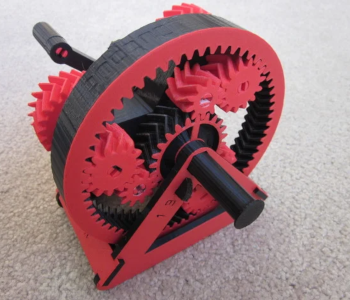
Nylon 3D printing gives you some of the toughest parts a desktop printer can make: gears, clips, hinges, and wear parts that bend instead of snapping. It is also one of the harder materials to print well, because nylon soaks up moisture from the air, warps as it cools, and changes its strength depending on how wet it is.
This guide covers which type of nylon to choose, how to dry and print nylon filament, what the real strength numbers are, and when it makes more sense to have nylon parts made by SLS or MJF instead.
What Nylon Is Good For, and What It Is Not
Nylon is the common name for polyamide (PA). In 3D printing it is chosen for four reasons:
- Toughness. It stretches a long way before it breaks. UltiMaker’s nylon filament stretches more than 120% in a flat-printed tensile test, against 7.8% for its PLA.
- Wear resistance. Low friction and good abrasion resistance make it a standard choice for gears, bushings, and sliding parts.
- Chemical resistance. It resists oils, greases, and fuels.
- Heat. It keeps its shape at higher temperatures than PLA. UltiMaker lists a heat deflection temperature of 89 °C for its nylon, against 59 °C for its PLA (both at 0.455 MPa).
It is a poor choice where a part must stay very stiff or hold tight dimensions in humid air. Nylon absorbs water, becomes softer, and grows slightly. If stiffness matters more than toughness, PLA, PETG, or a carbon fiber nylon is usually better. Our 3D printing material selection guide compares nylon with the other common filaments.
Types of Nylon for 3D Printing
| Type | What it is like | Best for |
|---|---|---|
| PA6 | Tough and strong, but absorbs moisture fastest and is the hardest to print | Experienced users with a dry box and enclosure |
| PA6/66 copolymer (for example Polymaker CoPA) | Easier to print than pure PA6, good heat resistance | General functional parts on an enclosed printer |
| PA11 | Made from castor oil, absorbs less moisture than PA6 | Flexible, impact-resistant parts |
| PA12 | Absorbs the least moisture, but warps badly as filament; the standard powder for SLS and MJF | Service-printed parts (SLS, MJF) |
| Carbon fiber or glass fiber nylon | Fibers make it stiffer and almost stop warping; needs a hardened nozzle | Brackets, jigs, and drone parts that must stay stiff |
Prusa chose PA11 for its carbon fiber filament for exactly these reasons: PA6 took on moisture too quickly, and PA12 warped too much and did not stick well to the print sheet.
Moisture: The One Thing You Must Manage
Nylon is hygroscopic: it pulls water out of the air. Polymaker measures 2.82% water absorption at equilibrium for its CoPA nylon at 70% relative humidity and 23 °C.
That water affects nylon twice:
- When printing. Wet nylon filament boils in the nozzle. The result is popping sounds, bubbles, stringing, a rough surface, and weak layers.
- After printing. The finished part keeps absorbing moisture. Strength and stiffness drop, while impact toughness rises.
Polymaker’s data sheet shows how large the change is:
| Property (Polymaker CoPA) | Dry | Wet |
|---|---|---|
| Tensile strength, printed flat (X-Y) | 78.0 MPa | 34.3 MPa |
| Tensile strength, across layers (Z) | 45.8 MPa | 13.7 MPa |
| Stiffness (Young’s modulus, X-Y) | 2,703 MPa | 724 MPa |
| Bending strength (X-Y) | 109.8 MPa | 22.6 MPa |
| Notched Charpy impact (X-Y) | 6.9 kJ/m² | 27.7 kJ/m² |
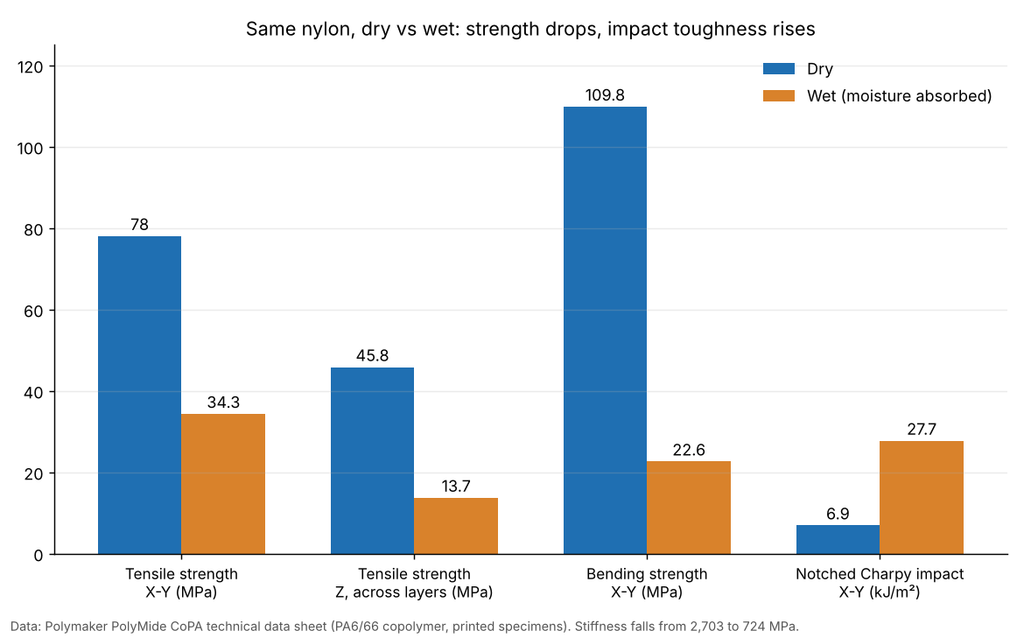
The practical lesson: design nylon parts with the wet values if they will live in normal room air, and treat dry datasheet numbers as the best case.
How to Dry Nylon Filament
Always dry nylon filament before printing, even from a new sealed spool. Follow the manufacturer’s data sheet for your filament; typical recommendations are:
- Polymaker PolyMide CoPA: 100 °C for 8 hours.
- Prusament PA11 Carbon Fiber: 90 °C for 4 to 6 hours.
A filament dryer is the safest way to do it. A kitchen oven can work, but many ovens overshoot their set temperature, which can soften the spool or fuse the windings. Check the oven with a separate thermometer first.
After drying, keep the filament dry while it prints. Polymaker recommends printing from a dry box below 20% relative humidity. Store opened spools in a sealed bag or box with desiccant.
Nylon Print Settings
Settings differ between brands, so start from the manufacturer’s profile. As an example, Polymaker recommends these for PolyMide CoPA with a 0.4 mm nozzle:
| Setting | Value |
|---|---|
| Nozzle temperature | 250–270 °C |
| Bed temperature | 25–50 °C |
| Bed surface | PC or textured PEI |
| Enclosure | Required (closed chamber) |
| Part cooling fan | Off |
| Print speed | 40–60 mm/s |
| Drying before printing | 100 °C for 8 hours |
Two hardware points apply to most nylon printing:
- Nozzle. Plain nylon prints with a brass nozzle, but carbon fiber nylon and glass fiber nylon wear brass out quickly. Use a hardened steel or ruby nozzle for filled grades. Polymaker also recommends a hardened nozzle for CoPA.
- Enclosure. An enclosure keeps the part warm so it shrinks evenly, and it improves layer adhesion. It also contains the fumes and fine particles, so print in a ventilated room.
How to Stop Nylon From Warping
Nylon shrinks as it cools, and large flat parts lift at the corners. In order of effect:
- Print in an enclosure with the part cooling fan off or very low.
- Use the bed surface the manufacturer recommends, and keep it clean. Prusa washes its nylon sheet only with water, because alcohol and acetone roughen it.
- Add a brim to large or sharp-cornered parts.
- Round sharp corners and avoid large flat bases where possible. Our guide to design for 3D printing covers this.
- Switch to a carbon fiber nylon. The fibers reduce shrinkage so much that Prusa describes its PA11 Carbon Fiber as virtually non-warping.
How Strong Is 3D Printed Nylon?
Printed flat, nylon is stronger than PLA. Across the layers, it is not. UltiMaker publishes test data for both materials printed on the same machine:
| Property (UltiMaker data) | Nylon | PLA |
|---|---|---|
| Tensile yield strength, printed flat | 63.1 MPa | 52.5 MPa |
| Tensile strength across layers (Z) | 23.0 MPa | 33.1 MPa |
| Elongation at break, printed flat | more than 120% | 7.8% |
| Heat deflection temperature (0.455 MPa) | 89 °C | 59 °C |
The real advantage of nylon is not peak strength. It is that a nylon part bends, absorbs impact, and survives where PLA would crack. For the PLA side of this comparison, see how strong PLA is. The same print rules for strength apply to both materials: orient the load along the layers, and use more walls rather than more infill, as explained in our guide to the best infill for strength.
FDM Nylon vs SLS and MJF Nylon
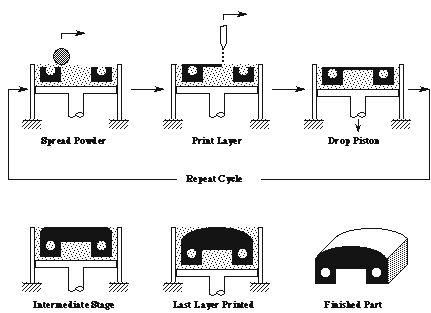
Most industrial nylon parts are not printed from filament. They are made by SLS (selective laser sintering) or MJF (Multi Jet Fusion), which fuse PA12 or PA11 powder layer by layer.
The big difference is consistency. HP lists the same tensile strength, 48 MPa, for MJF PA12 parts in every direction, with a heat deflection temperature of 175 °C at 0.45 MPa. A filament part, by contrast, is much weaker across its layers. Powder printing also needs no support structures, so internal channels and interlocking parts are possible.
| FDM nylon filament | SLS or MJF nylon (PA12) | |
|---|---|---|
| Strength across layers | Much lower than along layers | About the same in all directions |
| Supports | Needed for overhangs | Not needed |
| Surface | Visible layer lines | Slightly grainy, uniform |
| Moisture handling | Your job: drying and storage | Handled by the print service |
| Best for | One-off parts, in-house prototypes | Functional prototypes and small batches |
For achievable accuracy with each process, see our guide to 3D printing tolerances.
Should You Anneal Nylon Parts?
Annealing can make printed nylon more stable at temperature. Polymaker recommends 80 °C for 6 hours for CoPA parts. Follow the data sheet for your material, because temperatures differ between grades. Annealing works differently for PLA, where shrinkage is the main risk; see annealing PLA.
Frequently Asked Questions
Is nylon hard to 3D print?
It is harder than PLA or PETG, mainly because of moisture and warping. With dry filament, an enclosure, and the right bed surface, most enclosed printers can print it well.
Do I need a hardened nozzle for nylon?
For carbon fiber nylon and glass fiber nylon, yes, because the fibers wear out brass nozzles. Some manufacturers also recommend one for unfilled nylon.
How long should I dry nylon filament?
Typically 4 to 8 hours at 80 to 100 °C, depending on the brand. Polymaker recommends 100 °C for 8 hours for CoPA, and Prusa recommends 90 °C for 4 to 6 hours for PA11 Carbon Fiber.
Is nylon stronger than PLA?
It is tougher and more heat resistant, and it is stronger along the layers. Across the layers it can be weaker, and it loses strength and stiffness as it absorbs moisture.
What is the difference between PA6 and PA12?
PA6 is strong and tough but absorbs more moisture. PA12 absorbs less moisture and is the standard powder for SLS and MJF, but as filament it warps badly.
Need Tough Nylon Parts?
RunTechEngineer helps choose the right material and process for functional parts, from FDM prototypes to nylon parts for small batches. See our 3D printing services, or contact us with your part, its load, and where it will be used.