Mesh convergence is the check that tells you whether a finite element result describes the part or only the mesh. Refine the mesh, run the model again, and compare the number you care about. If it stops changing, the mesh is fine enough. If it keeps climbing no matter how fine the mesh gets, something in the model is wrong, and it is usually the boundary conditions.
This guide runs a real mesh convergence study on a plate with a hole and checks it against a hand calculation. It then repeats the exercise on a plate held by a fixed support, where the peak stress never settles. Both results come from the same solver, so the difference is entirely in how the model was set up.
What Mesh Convergence Means
Finite element analysis splits a part into small elements and solves for the displacement at their nodes. Stress is calculated from how those displacements change across each element. Smaller elements follow a steep stress gradient more closely, so the answer improves as the mesh gets finer.
A result is converged when further mesh refinement no longer changes it by more than a small, agreed amount. Two points are easy to miss:
- Convergence belongs to one quantity at one location. Displacement converges with a coarse mesh. Peak stress at a hole or fillet needs a much finer one.
- Converged is not the same as correct. A converged model with the wrong load, support or material gives a stable, wrong answer. Convergence only removes the error caused by the mesh.
How to Run a Mesh Convergence Study
- Decide what you will check. Pick the result your decision depends on, such as the peak von Mises stress at a fillet or the deflection at a mounting point. Note its exact location.
- Run a sensible first mesh. Use the software’s default size, with good element quality and at least a few elements across thin walls.
- Refine where it matters. Halve the element size at the critical location. Refining the whole model wastes time; local mesh refinement around holes, fillets and contact areas is enough.
- Compare the same quantity at the same point. Write down the value and the percentage change from the previous run.
- Repeat until the change is small. A common limit is 2–5% between two successive refinements. Use the tighter end for fatigue, because life changes far more than stress does.
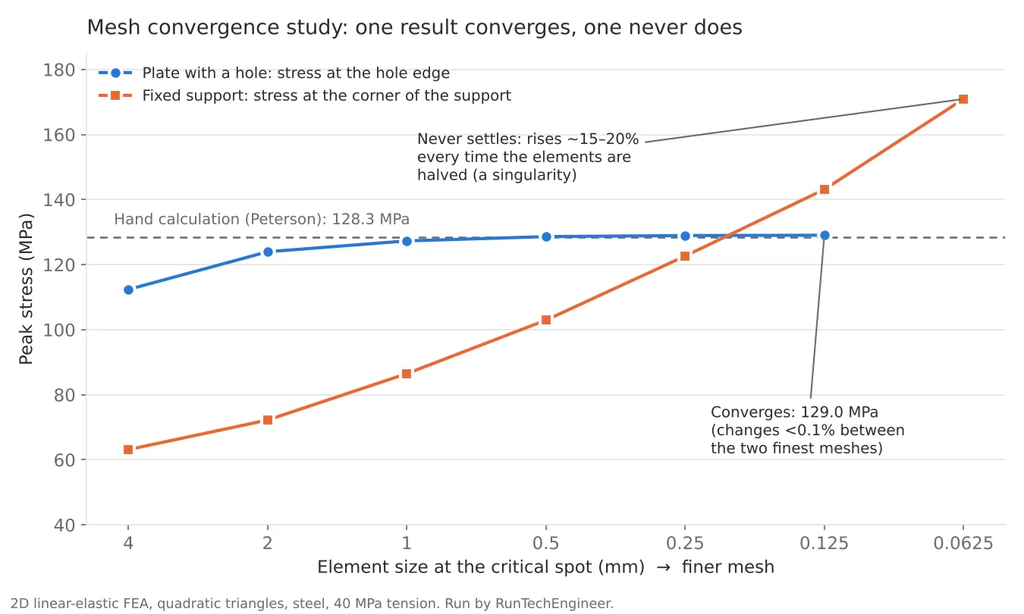
- Check the trend, not just the last step. A converging result changes less with every refinement. A result that grows by a similar amount every time is not converging, however fine the mesh is.
Worked Example: A Plate With a Hole
The test part is a steel plate 200 mm long and 50 mm wide with a 12 mm hole in the center, pulled with a uniform stress of 40 MPa at its ends. That is 10 kN on a 5 mm thick plate. Because the part is symmetric, only one quarter was modeled, using 2D quadratic triangle elements and linear elastic steel (E = 200 GPa, ν = 0.3).
Hand calculation first. The net section beside the hole is 50 − 12 = 38 mm wide, so the nominal stress there is:
σ_nom = 40 × 50 / 38 = 52.6 MPa
Peterson’s curve fit for a central hole in a finite-width plate gives the stress concentration factor, with d/W = 12/50 = 0.24:
Kt = 3.00 − 3.13(d/W) + 3.66(d/W)² − 1.53(d/W)³ = 2.44
σ_max = Kt × σ_nom = 2.44 × 52.6 = 128.3 MPa
The FEA results. The element size at the hole edge was halved five times:
| Element size at the hole (mm) | Elements (quarter model) | Peak stress at hole edge (MPa) | Change from previous run | Displacement at loaded end (µm) |
|---|---|---|---|---|
| 4 | 268 | 112.3 | — | 20.68 |
| 2 | 318 | 123.9 | +10.3% | 20.71 |
| 1 | 427 | 127.3 | +2.7% | 20.72 |
| 0.5 | 622 | 128.6 | +1.0% | 20.72 |
| 0.25 | 1,157 | 128.9 | +0.3% | 20.73 |
| 0.125 | 2,769 | 129.0 | +0.1% | 20.73 |
Three things stand out:
- The coarse mesh was 13% low. With 4 mm elements, only two or three elements cover each quarter of the hole, and they cannot follow the stress peak. The model looked reasonable and gave a wrong answer with full confidence.
- The stress settled at 129.0 MPa, 0.6% above the hand calculation. The 1 mm mesh, about ten elements per quarter of the hole, was already within 1.5% of the final value.
- Displacement converged from the start. It changed by only 0.24% across the whole study. A displacement check would have said the coarse mesh was fine, while the stress was off by 13%.
Estimating the Converged Value From Three Meshes
You do not always need to refine until the change is tiny. With three meshes refined by the same ratio r, Richardson extrapolation estimates both the rate of convergence p and the value the mesh is heading toward:
p = ln[(f3 − f2) / (f2 − f1)] / ln(r)
f_converged ≈ f1 + (f1 − f2) / (r^p − 1)
Here f1 is the finest mesh and f3 the coarsest. Using the 1, 0.5 and 0.25 mm results (127.28, 128.60 and 128.93 MPa) with r = 2:
- p = ln(1.32 / 0.33) / ln(2) ≈ 2.0
- f_converged ≈ 128.93 + 0.33 / (2² − 1) ≈ 129.0 MPa
The estimate matches the 0.125 mm run that took more than twice as many elements. An order p close to the theoretical value is a good sign that the meshes are already in the range where the error shrinks predictably. If p comes out negative or wildly different between runs, the result is not converging and the estimate means nothing. The grid convergence index, proposed by Patrick Roache in 1994, builds a safety factor on top of this estimate for reporting.
Stress Concentration or Stress Singularity?
A stress concentration is real. The hole above raises the stress to about 2.4 times the nominal value, and a strain gauge on a real plate would measure it. A stress singularity is a point where the math of linear elasticity gives infinite stress, so the FEA value depends only on how small the elements are.
| Stress concentration | Stress singularity | |
|---|---|---|
| What causes it | A real shape: hole, fillet, notch with a radius | An idealization: perfectly sharp inside corner, point load, edge of a fixed support |
| With mesh refinement | Converges to a finite value | Keeps rising, roughly by the same percentage each time |
| Can you design with it? | Yes, it is the stress the part sees | No, the peak value has no meaning |
| What to do | Refine the mesh until it converges | Fix the model, or read the stress away from the point |
Boundary Conditions: Where Most FEA Errors Start
Boundary conditions tell the model how the part is held and loaded. They are the main source of wrong FEA results, more often than the mesh or the solver, because every support in the model is an idealization of a bolt, a weld, a bearing or a clamp.
| Support type | What it does in the model | When it is realistic | Main risk |
|---|---|---|---|
| Fixed | Stops all movement and rotation | Far from the area you are judging, or a truly rigid, bonded joint | Singularity at its edges; part made too stiff |
| Pinned (hinge) | Stops movement, allows rotation | Pin joints, simple beam supports | Point contact if applied to a single edge or node |
| Roller or frictionless | Stops movement normal to a face only | Parts resting on a smooth surface | Too free if the real joint has friction or bolts |
| Symmetry | Mirror plane: no movement across it | Geometry, loads and supports are all symmetric | Hides non-symmetric failure modes such as buckling |
| Elastic support | A face backed by springs of chosen stiffness | Mounting on a frame, rubber pads, soft structure | Needs a realistic stiffness value |
| Bolts and contact | Models the joint as it is | When the joint area itself is critical | Slower, nonlinear, needs friction and preload data |
Two rules cover most cases:
- Hold the part only as much as the real part is held. Too few supports and the solver stops on rigid-body motion. Too many and the model is stiffer than the real part, so stress and deflection are wrong in a way no mesh refinement will reveal.
- Spread every load and support over a real area. A force on a single node or a support on a single edge is a singularity by definition. Apply the load over the contact patch it really acts on.
Worked Example: The Same Material With a Fixed Edge
To show what a boundary condition can do, a plain 100 × 50 mm steel plate with no hole was pulled with the same 40 MPa. The hand calculation is trivial: the stress is 40 MPa everywhere. The plate was supported two ways.
- Roller support on the left edge (stops movement along the load, free sideways): every mesh gave exactly 40.0 MPa everywhere, matching the hand calculation.
- Fixed support on the left edge (stops movement in all directions): the peak von Mises stress appeared at the corners of the support and rose with every refinement.
| Element size at the support corner (mm) | Peak von Mises stress at the corner (MPa) | Change from previous run | Stress about 20 mm from the support (MPa) |
|---|---|---|---|
| 4 | 63.1 | — | 40.3 |
| 2 | 72.2 | +14% | 40.1 |
| 1 | 86.5 | +20% | 39.7 |
| 0.5 | 102.9 | +19% | 40.3 |
| 0.25 | 122.6 | +19% | 39.9 |
| 0.125 | 143.1 | +17% | 40.2 |
| 0.0625 | 170.9 | +19% | 40.3 |
The fixed edge stops the plate from narrowing as it stretches, which a real plate does through the Poisson effect. At the corner where the held edge meets the free edge, the elastic solution has no finite answer, so the number simply follows the element size. A designer who stopped at 2 mm would report 72 MPa; at 0.0625 mm the same model says 171 MPa. Neither is real. Away from the corner the result is steady at about 40 MPa, which is why a singularity at a support is harmless when the area you are judging is far from it.
How to Deal With a Singularity
- Find out whether the spot matters. If the critical area is far from the singularity, judge the stress there and ignore the peak at the support. Stress a short distance away is still correct.
- Model the real geometry. Replace a perfectly sharp inside corner with the actual fillet radius. The peak then converges to a real stress concentration.
- Replace a fixed support with a realistic one. Use a roller, symmetry, an elastic support, or model part of the mounting structure and the bolts.
- Spread point loads. Apply the load over the real contact area, or through a stiff pad that represents the mating part.
- Do not use a coarse mesh to hide it. A coarse mesh gives a finite number at a singularity only because it cannot resolve it. That number is arbitrary, not safe.
Common Mistakes
- Checking convergence on displacement and then reporting stress.
- Comparing the maximum stress anywhere in the model instead of the value at one fixed location. The peak can jump to a different spot between runs.
- Refining the whole model uniformly instead of the critical area, then giving up because the run takes too long.
- Calling a result converged after one refinement, without seeing the change get smaller.
- Treating a fixed support as “safe and simple” when the critical area is next to it.
- Using the converged peak stress with the wrong failure criterion. For ductile metals compare von Mises stress with yield and check the factor of safety; for cyclic loads go on to a fatigue analysis.
For a full worked FEA from hand check to safety factor, see predicting mechanical failure with FEA.
Frequently Asked Questions
What is mesh convergence in FEA?
It is the point where making the elements smaller no longer changes the result you care about by more than a small amount. A mesh convergence study proves it by running the same model with progressively finer meshes and comparing the result at the same location.
How do I know when my mesh is converged?
When two successive refinements change the result at the critical location by less than an agreed limit, commonly 2–5%, and each change is smaller than the one before. For fatigue work, aim for the lower end of that range.
Why does my stress keep increasing when I refine the mesh?
The peak is most likely a stress singularity: a sharp inside corner, a point load, or the edge of a fixed support. The value depends on the element size and has no physical meaning. Model the real fillet or support, or judge the stress away from that point.
What are boundary conditions in FEA?
They are the supports and loads that describe how the part is held and what acts on it, such as a fixed face, a symmetry plane, a pressure or a bolt preload. They decide the result more than any other input, so they should match the real mounting as closely as practical.
Is a finer mesh always better?
No. Past convergence, a finer mesh only adds solve time. At a singularity, it makes the peak stress worse, not more accurate. Refine where the stress changes quickly and keep the rest of the model coarse.
Need an FEA You Can Trust?
Every FEA report from RunTechEngineer includes a hand calculation and a mesh convergence check at the critical locations, with boundary conditions based on how the part is really mounted. See our FEA services or contact us with your model and loads.